
The official Egypt eVisa portal at visa2egypt.gov.eg is the only legitimate website where you can apply for an electronic visa to Egypt. Managed by the Egyptian Ministry of Interior, the portal lets eligible travelers complete the entire visa process online – from account creation to payment and approval. This guide walks you through every screen, button, and step of the portal so you can submit your application with confidence.
Using the official portal directly costs $25 for a single-entry eVisa or $60 for a multiple-entry eVisa. Third-party websites often charge $60-$100+ in service fees for the same document. Knowing how to navigate visa2egypt.gov.eg saves you money and ensures your application reaches the Egyptian government without intermediaries.
What Is visa2egypt.gov.eg?
visa2egypt.gov.eg is the official electronic visa portal operated by the Arab Republic of Egypt’s Ministry of Interior. The site launched as part of Egypt’s initiative to modernize its border procedures and reduce wait times at international airports like Cairo (CAI), Hurghada (HRG), Sharm El Sheikh (SSH), and Luxor (LXR).
The portal handles the complete eVisa lifecycle:
- Account registration – create your applicant profile
- Visa application – submit personal, passport, and travel details
- Document upload – attach your passport scan and photo
- Online payment – pay the visa fee by credit or debit card
- Status tracking – monitor your application progress
- Visa download – retrieve your approved eVisa as a PDF
The portal is available in multiple languages and accepts applications from citizens of over 74 eligible countries, including the United States, United Kingdom, Canada, Australia, Japan, India, and most European Union nations.
Portal Homepage Overview
When you first visit visa2egypt.gov.eg, you see a clean government portal with the following layout:
Header and Navigation
The top of the page displays the official Arab Republic of Egypt Electronic Visa Portal logo featuring the Eagle of Saladin. The main navigation bar includes:
- Home – return to the homepage
- About Egypt – general information about the country
- How to Apply – overview of the application process
- Disclaimer – legal notices and terms
- Apply Now – direct link to start your application
- FAQ – frequently asked questions
- Contact Us – support and helpdesk information
In the top-right corner, you will find Sign In and Sign Up buttons, plus a language selector dropdown to switch between English and other available languages.
The Four-Step Process Display
The homepage prominently displays the eVisa processing steps in four columns:
| Step | Action | What It Means |
|---|---|---|
| 1. Sign Up | Create your account | Register with your email and basic personal information |
| 2. Sign In | Access your account | Log in to view applications or start a new one |
| 3. Apply and Pay Online | Complete the form and pay | Fill in the application, upload documents, and pay the fee |
| 4. Application Processing | Wait for approval | The government reviews your application and sends a decision by email |
Step 1: Creating Your Account (Sign Up)
To begin, click the Sign Up button on the homepage or in the top navigation bar. The registration form requires:
- Full name – must match your passport exactly (first name, middle name, last name)
- Email address – use an active email you check regularly; all notifications go here
- Password – create a secure password (the portal typically requires a minimum length and a mix of characters)
- Nationality – select your citizenship from the dropdown menu
- Date of birth – enter in the required format (usually DD/MM/YYYY)
Account Registration Tips
- Use your legal name. If your passport says “Mohammed Ali Hassan,” do not register as “Mo Hassan.” Name mismatches between your account and passport can cause delays or rejections.
- Use a personal email, not a work email. Corporate email filters sometimes block government correspondence. Gmail, Outlook, or Yahoo are reliable choices.
- Check your spam folder. The portal sends a verification email after registration. If you do not see it in your inbox within 5 minutes, check your spam or junk folder.
After submitting the registration form, open the verification email and click the confirmation link. This activates your account and redirects you to the portal’s login page.
Step 2: Signing In to the Portal
Click Sign In in the top navigation bar. Enter your registered email and password. Once logged in, you reach your dashboard, which shows:
- New Application – start a fresh eVisa application
- Pending Applications – view applications that are still under review
- Completed Applications – access approved eVisas for download
- Profile Settings – update your account information
Step 3: Starting a New eVisa Application
From your dashboard, click Apply Now or New Application. The portal guides you through several screens:
3a. Select Visa Type
Choose between:
| Visa Type | Fee | Validity | Stay Allowed | Best For |
|---|---|---|---|---|
| Single-entry eVisa | $25 USD | 90 days from issue | Up to 30 days | One-time tourist visit |
| Multiple-entry eVisa | $60 USD | 90 days from issue | Up to 30 days per entry | Business travelers, multiple trips |
3b. Personal Information
Fill in the following fields exactly as they appear on your passport:
- Full name (first, middle, last)
- Gender
- Date of birth
- Place of birth (city and country)
- Nationality
3c. Passport Details
Enter your passport information carefully:
- Passport number
- Issue date
- Expiry date
- Issuing country
Critical: Your passport must be valid for at least 6 months beyond your planned arrival date in Egypt. The portal may reject applications from passports that expire sooner. Double-check the passport number – a single digit error is the most common reason for processing delays.
3d. Contact and Travel Information
Provide:
- Email address (pre-filled from your account)
- Phone number with country code
- Home address
- Intended arrival date in Egypt
- Purpose of visit (tourism, business, etc.)
- Accommodation address in Egypt (hotel name and city, or host’s address)
3e. Employment Information
Some applicants are asked for:
- Current occupation
- Employer name and address
This field is typically optional for tourist visa applicants but may be required for business visa applicants.
Step 4: Uploading Documents
The portal requires you to upload supporting documents. Prepare these before starting your application:
Passport Bio-Data Page Scan
- Format: JPEG, PNG, or PDF
- Maximum file size: 2 MB
- Quality: all text must be clearly legible, photo must be visible
- Content: the full bio-data page showing your photo, name, passport number, and expiry date
Passport-Style Photo (If Requested)
Some applicants are prompted to upload a recent photo. Requirements:
- White or light-colored background
- Taken within the last 6 months
- Face clearly visible, no sunglasses or head coverings (unless for religious reasons)
- JPEG or PNG format
- File size under 2 MB
Document Upload Tips
- Scan in color, not black and white
- Ensure no glare or shadows cover any text
- Crop the image to show only the passport page (no table edges or fingers)
- If the upload fails, try reducing the file size using an image compressor before re-uploading
Step 5: Paying the Visa Fee
After completing the form and uploading documents, the portal redirects you to the payment page. Accepted payment methods include:
- Visa credit or debit cards
- Mastercard credit or debit cards
- Maestro debit cards
The fee is charged in US dollars (USD):
| Entry Type | Fee |
|---|---|
| Single entry | $25 |
| Multiple entry | $60 |
Payment Tips
- The fee is non-refundable, even if your application is denied
- Your bank may charge a small foreign transaction fee (typically $1-$3)
- Some travelers report being charged $28-$30 instead of exactly $25 due to payment gateway processing fees
- If your payment fails, wait 15 minutes before trying again to avoid duplicate charges
- Save or screenshot your payment confirmation for your records
Step 6: Tracking Your Application Status
After payment, your application enters the processing queue. The portal displays one of these statuses:
| Status | Meaning |
|---|---|
| Submitted | Application received, awaiting review |
| Under Review | Government officials are evaluating your application |
| Approved | Visa granted – download your eVisa PDF |
| Rejected | Application denied – see email for reason |
Processing Time
- Standard processing: 5-7 business days
- Fastest reported: 24-48 hours
- Recommended timing: Apply at least 7 days before your departure date
You will receive email notifications whenever your application status changes. You can also log in to the portal at any time to check manually.
Step 7: Downloading Your Approved eVisa
Once your status shows Approved, follow these steps:
- Log in to your account at visa2egypt.gov.eg
- Go to Completed Applications or My Applications
- Click on the approved application
- Click Download or Print eVisa
- Save the PDF file to your device
- Print at least two physical copies – one for your carry-on and one for your checked luggage
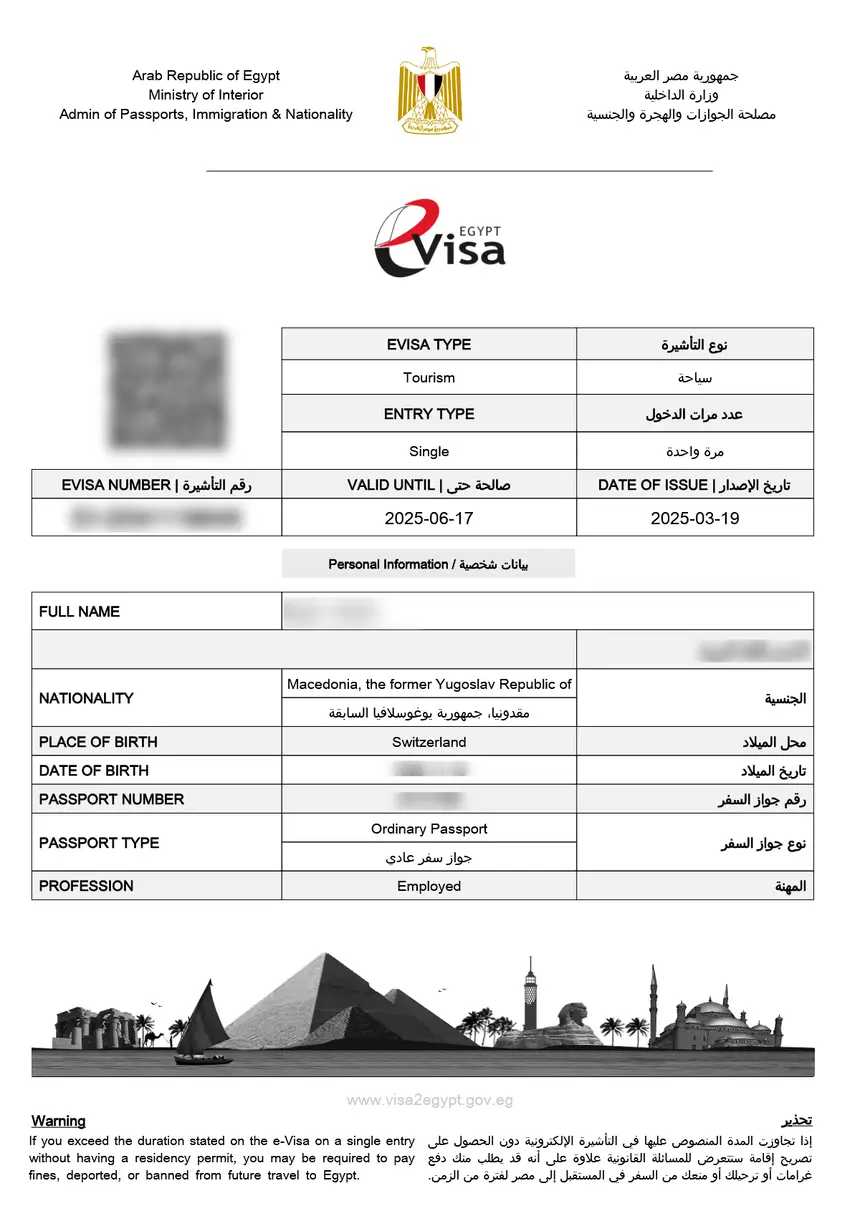
What the eVisa PDF Contains
Your approved eVisa PDF includes:
- Your full name and passport number
- Visa type (single or multiple entry)
- Issue date and expiry date
- Barcode and reference number
- QR code for immigration scanning
Present this printed eVisa along with your passport to the immigration officer when you arrive in Egypt.
Common Portal Problems and Solutions
| Problem | Cause | Solution |
|---|---|---|
| Cannot create account | Email already registered | Try “Forgot Password” to recover your existing account |
| Verification email not received | Spam filter or typo | Check spam folder; ensure email address is correct |
| Upload fails | File too large or wrong format | Compress the image to under 2 MB; use JPEG or PNG |
| Payment declined | Bank blocks foreign transaction | Call your bank to authorize the payment, or try a different card |
| Application stuck on “Submitted” | Normal processing delay | Wait 5-7 business days; contact support if longer than 10 days |
| Name mismatch error | Account name differs from passport | Update your profile name to match your passport exactly |
| Portal not loading | Browser compatibility | Use Chrome, Firefox, or Edge; clear your browser cache |
How to Contact the eVisa Portal Support
If you encounter issues that the FAQ does not resolve, you can reach the portal’s support team through:
- Contact Us page – fill in the contact form on visa2egypt.gov.eg with your application reference number and a description of the issue
- Email – the portal sends support contact details in confirmation emails
- Response time – typically 2-5 business days for email replies
When contacting support, always include:
- Your full name (as on the application)
- Application reference number
- Passport number
- A clear description of the problem
- Screenshots of any error messages
Safety Tips for Using visa2egypt.gov.eg
- Only use the official URL: visa2egypt.gov.eg – look for the
.gov.egdomain, which confirms it is an Egyptian government website - Beware of copycat sites: Third-party websites may look similar but charge extra fees or mishandle your data
- Never share your password with anyone, including people claiming to be support staff
- Use a secure connection: Always access the portal from a private network, not public Wi-Fi
- Log out after each session, especially if using a shared computer
Frequently Asked Questions
Is visa2egypt.gov.eg the only official eVisa portal?
Yes. visa2egypt.gov.eg is the only website operated by the Egyptian government for electronic visa applications. Any other site charging for an “Egypt eVisa” is a third-party service that adds a markup.
Can I apply for someone else through my account?
Yes, the portal allows you to submit applications on behalf of family members or travel companions. Each application is processed individually with its own reference number.
What if I made a mistake on my submitted application?
If your application is still in “Submitted” status, you may be able to withdraw it and submit a new one. If it is already “Under Review” or “Approved,” contact support with your reference number and describe the error. Minor spelling mistakes (e.g., one letter in your name) are usually acceptable, but incorrect passport numbers require a new application.
Do I need to print the eVisa, or can I show it on my phone?
While some travelers report showing a digital copy on their phone, the official recommendation is to print a physical copy. Immigration officers at Egyptian airports prefer a printed eVisa, and technical issues with your phone at the border could cause delays.
Can I apply for an eVisa if I am already in Egypt?
No. The eVisa must be obtained before arriving in Egypt. If you are already in the country and need a visa extension, you must visit the nearest Mogamma (government administrative building) or passport office in Egypt.
What happens if my eVisa expires before I travel?
An unused, expired eVisa cannot be extended or refunded. You must submit a new application and pay the fee again. Plan your application so the 90-day validity covers your intended travel dates.